Step-by-step example of using a C dynamic library with dependencies in Xamarin.Mac or MonoMac
The quick answer
Add the dynamic library plus any non-system dynamic library dependencies as "Native References" in Xamarin Studio.
-
Fix up the shared library install names
for all of the libraries. Specifically, use install_name_tool -change (see the man page) to set all of the non-system dependencies to match one of the following two options:
Import methods from your library via [DllImport("libmylibrary")], and then P/Invoke them.
Small example app
Here's a complete working example: MonoMacNativeLib.zip. You can follow the steps below to recreate this project.
Example step 1: Create two native libraries, one dependent on the other
Copy and paste these example files, or download the zip.
liba.h
int foo();
liba.c
#include "liba.h"

int foo() {
    return 5;
}
libb.h
int bar();
libb.c
#include "libb.h"
#include "liba.h"

int bar() {
    return foo();
}
Example step 2: Build the native libraries
Makefile
OBJDIR := obj
LIBDIR := lib

all: $(LIBDIR)/libb.dylib


$(OBJDIR)/%.o : %.c %.h | $(OBJDIR)
	clang -arch i386 -fpic -c $< -o $@


$(LIBDIR)/liba.dylib: $(OBJDIR)/liba.o | $(LIBDIR)
	clang -arch i386 -dynamiclib $(OBJDIR)/liba.o -o $(LIBDIR)/liba.dylib

$(LIBDIR)/libb.dylib: $(OBJDIR)/libb.o $(LIBDIR)/liba.dylib
	clang -arch i386 -dynamiclib $(OBJDIR)/libb.o $(LIBDIR)/liba.dylib -o $(LIBDIR)/libb.dylib


$(OBJDIR):
	mkdir -p obj

$(LIBDIR):
	mkdir -p lib

clean:
	rm $(OBJDIR)/* $(LIBDIR)/*
Be sure to build for the i386 architecture since neither MonoMac nor Xamarin.Mac yet supports 64-bit applications.
Example step 3: Try to use the libraries in a MonoMac application
-
Create a new MonoMac Project
, or a new Xamarin.Mac Project
.
-
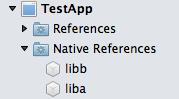
Add the compiled liba.dylib and libb.dylib libraries as Native References
.
-
Add a text field (for example a Wrapping Label
) to the MainWindow.xib layout as a place to display the return value of the native library method. Connect the text field to an outlet.
-
DllImport the method from the native library:
[DllImport("libb", EntryPoint = "bar")]
public static extern int Bar();
-
Create a MainWindowController.WindowDidLoad() override method that P/Invokes the native method and outputs the results:
public override void WindowDidLoad()
{
    base.WindowDidLoad();
    OutputTextField.StringValue = Bar().ToString();
}
-
Try building and running the app.
Example step 4: System.DllNotFoundException: libb
caused by Library not loaded: lib/liba.dylib
Running the app at this step causes a DllNotFoundException.
Abridged stack trace
Unhandled Exception:
System.DllNotFoundException: libb
at (wrapper managed-to-native) TestApp.MainWindowController.Bar ()
at TestApp.MainWindowController.WindowDidLoad ()
Get more information by running the app from the command line
In this case the DllNotFoundException is misleading. The problem is not actually that libb.dylib cannot be found. We can get more information about what's really happening if we run the app from the command line:
MONO_LOG_LEVEL=debug MONO_ENV_OPTIONS=--trace=E:all TestApp/bin/Debug/TestApp.app/Contents/MacOS/TestApp > TestApp.o.txt 2> TestApp.e.txt
Additional error from the TestApp.o.txt file: Library not loaded: lib/liba.dylib … image not found
Mono: DllImport attempting to load: 'libb'.
Mono: DllImport error loading library '~/Projects/TestApp/TestApp/bin/Debug/TestApp.app/Contents/MonoBundle/libb': 'dlopen(~/Projects/TestApp/TestApp/bin/Debug/TestApp.app/Contents/MonoBundle/libb, 9): image not found'.
Mono: DllImport error loading library '~/Projects/TestApp/TestApp/bin/Debug/TestApp.app/Contents/MonoBundle/libb.dylib': 'dlopen(~/Projects/TestApp/TestApp/bin/Debug/TestApp.app/Contents/MonoBundle/libb.dylib, 9): Library not loaded: lib/liba.dylib
Referenced from: ~/Projects/TestApp/TestApp/bin/Debug/TestApp.app/Contents/MonoBundle/libb.dylib
Reason: image not found'.
Thanks to the MONO_LOG_LEVEL=debug environment variable, the standard output now tells us that the real reason we're getting the DllNotFoundException for libb is that the program can't find lib/liba.dylib.
Side note: if you prefer, you can set the MONO_LOG_LEVEL environment variable to debug by creating an Environment variables
(aka LSEnvironment) property in the Info.plist. Then the verbose output will appear in Xamarin Studio's Application Output pad when you debug the app.
Example step 5: lib/liba.dylib is not found
because there is no file at that path
Let's check the contents of the app bundle:
$ cd TestApp/TestApp/bin/Debug/; find TestApp.app/Contents
TestApp.app/Contents
TestApp.app/Contents/Info.plist
TestApp.app/Contents/MacOS
TestApp.app/Contents/MacOS/TestApp
TestApp.app/Contents/MonoBundle
TestApp.app/Contents/MonoBundle/liba.dylib
TestApp.app/Contents/MonoBundle/libb.dylib
TestApp.app/Contents/MonoBundle/MonoMac.dll
TestApp.app/Contents/MonoBundle/TestApp.exe
TestApp.app/Contents/MonoBundle/TestApp.exe.mdb
TestApp.app/Contents/Resources
TestApp.app/Contents/Resources/MainMenu.nib
TestApp.app/Contents/Resources/MainWindow.nib
We can see that both liba.dylib and libb.dylib are in the MonoBundle/ folder. And more importantly, there is no lib/ folder. This is the correct behavior.
Example step 6: The incorrect reference to lib/liba.dylib is within libb.dylib itself. It is not related to MonoMac.
We can immediately see that libb.dylib contains an incorrect reference if we check the dynamic library dependencies using otool:
$ otool -L libb.dylib
libb.dylib:
        lib/libb.dylib (compatibility version 0.0.0, current version 0.0.0)
        lib/liba.dylib (compatibility version 0.0.0, current version 0.0.0)
        /usr/lib/libSystem.B.dylib (compatibility version 1.0.0, current version 169.3.0)
We can also confirm that attempting to load libb from a C program hits the same problem as the MonoMac app:
prog.c
#include <stdio.h>
#include <dlfcn.h>

int
main(int argc, char **argv)
{
    void *libb;
    libb = dlopen("libb.dylib", 0);
    if (!libb) {
        fprintf(stderr, "%s\n", dlerror());
        return 1;
    }
    return 0;
}
Build and run
$ cd TestApp/TestApp/bin/Debug/TestApp.app/Contents/MonoBundle
$ clang -arch i386 prog.c -o prog
$ ./prog
Error
dlopen(libb.dylib, 0): Library not loaded: lib/liba.dylib
Referenced from: ~/Projects/TestApp/TestApp/bin/Debug/TestApp.app/Contents/MonoBundle/libb.dylib
Reason: image not found
Example step 7: Correct the install name of liba.dylib to @loader_path/liba.dylib
Fortunately, this incorrect reference is easy to fix. We can just use install_name_tool to fix it up:
$ cd TestApp/TestApp/lib
$ install_name_tool -change lib/liba.dylib @loader_path/liba.dylib libb.dylib
The special @loader_path value tells dlopen() to search for liba in a path relative to libb.
Example step 8: Build and run again: success!
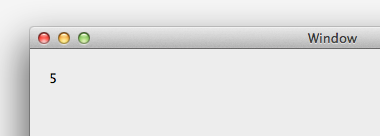
If we now re-build the MonoMac app and debug it, the app calls the native library successfully and outputs the result!
Example step 9: Use -install_name at compile time instead of using install_name_tool
Download the updated version of the native libraries folder.
If we pass the -install_name argument to clang, we can set the install name for liba.dylib to @loader_path/liba.dylib right in the Makefile. That way we won't have to worry about fixing it again if we later rebuild the native libraries.
Updated Makefile lines
$(LIBDIR)/liba.dylib: $(OBJDIR)/liba.o | $(LIBDIR)
	clang -arch i386 -dynamiclib -install_name "@loader_path/liba.dylib" $(OBJDIR)/liba.o -o $(LIBDIR)/liba.dylib

$(LIBDIR)/libb.dylib: $(OBJDIR)/libb.o $(LIBDIR)/liba.dylib
	clang -arch i386 -dynamiclib -install_name "@loader_path/libb.dylib" $(OBJDIR)/libb.o $(LIBDIR)/liba.dylib -o $(LIBDIR)/libb.dylib
Addendum: alternatives to including libraries as Native References
It is not strictly necessary to include dynamic libraries as Native References
when using them in a MonoMac app. It is the easiest option when using single-file libraries. But for frameworks a better option is to mimic the layout of Objective-C apps and copy each framework folder directly into the Content directory of the app bundle. In most cases, this approach will require a few additional steps to tell the MonoMac app where to find the libraries.
Another update with more details soon.
Found a mistake?
Submit a comment or correction
Links
- http://www.mono-project.com/Interop_with_Native_Libraries
Copyright (c) 2014 Xamarin Inc http://www.xamarin.com
Permission is hereby granted, free of charge, to any person obtaining a copy of this software and associated documentation files (the "Software"), to deal in the Software without restriction, including without limitation the rights to use, copy, modify, merge, publish, distribute, sublicense, and/or sell copies of the Software, and to permit persons to whom the Software is furnished to do so, subject to the following conditions:
The above copyright notice and this permission notice shall be included in all copies or substantial portions of the Software.
Updates